nf-core/provenancereport
A simple provenance reporting pipeline
Introduction
This document describes the output produced by the pipeline.
The directories listed below will be created in the results directory after the pipeline has finished. All paths are relative to the top-level results directory.
Output summary
| Output | Path | Purpose |
|---|---|---|
| Rendered report | quartonotebook/*.html |
Final Quarto HTML report generated from all samplesheet inputs. |
| Report source | quartonotebook/*.qmd |
Prepared notebook copy used to render the report, including the guarded package-version fallback. |
| Rendered report index | reports.csv |
Nextflow-generated index of the published HTML report. |
| Report source index | notebook.csv |
Nextflow-generated index of the published prepared notebook. |
| Report artifacts | quartonotebook/artifacts/* |
Images, tables, summaries, or other secondary files written by the notebook. |
| Report artifact index | artifacts.csv |
Nextflow-generated index of the published report artifacts. |
| File checksums | md5sum/provenancereport.md5 |
MD5 checksums for every samplesheet input, the rendered report, and the optional review document. |
| MultiQC audit report | multiqc/multiqc_report.html |
Human-readable summary of inputs, outputs, checksums, parameters, software, and runtime details. |
| MultiQC output index | multiqc_report.csv |
Nextflow-generated index of the published MultiQC report and data directory. |
| Optional review document | <original document filename> |
Copy of the file supplied with --document, published at the results root. |
| Review document index | document.csv |
Nextflow-generated index, published only when --document is supplied. |
| BioCompute Object | pipeline_info/manifest_<timestamp>.bco.json |
Machine-readable BCO provenance record generated by nf-prov. |
| Workflow Run RO-Crate | ro-crate-metadata.json |
Machine-readable Workflow Run RO-Crate metadata generated by nf-prov. |
| RO-Crate supporting files | Files copied to the results root | Pipeline definition and workflow inputs recorded by nf-prov alongside the crate metadata. |
| Nextflow execution record | pipeline_info/ |
Execution report, timeline, trace, DAG, parameters, and collected software versions. |
Pipeline overview
The pipeline is built using Nextflow and renders Quarto reports from user-provided input files. It processes data using the following steps:
- Quarto notebook reports - HTML reports rendered by the nf-core
quarto_notebookmodule - File checksums - MD5 checksums for report inputs, the rendered report, and the optional review document
- Review document - Optional review or sign-off file published with the run
- MultiQC execution report - Auditable summary of the run configuration and runtime environment
- nf-prov provenance - Provenance reports generated by the
nf-provplugin - Pipeline information - Report metrics generated during the workflow execution
Quarto notebook reports
Output files
quartonotebook/*.html: One rendered HTML report for the full samplesheet. The default filename is based on the notebook name, for exampleprovenance_report.html.*.qmd: The prepared Quarto notebook used to generate the report. Its name is prefixed withprepared_to distinguish it from the unchanged source notebook.
reports.csv: Nextflow-generated index containing the published HTML report path.notebook.csv: Nextflow-generated index containing the published prepared-notebook path.
The reports are generated by the nf-core quarto_notebook module. The workflow passes the selected notebook, a parameter map describing all samplesheet rows, and the staged input files into the module. This allows custom notebooks to read one or more files from the task working directory and render report-specific output.
RENDER_QUARTO_WITH_PROVENANCE groups notebook preparation and rendering into one local subworkflow. Within it, QUARTO_PREPARE creates the published notebook copy and appends a guarded hidden cell for runtime package capture. QUARTO_NOTEBOOK reports Quarto and Papermill through its eval outputs and collects notebook package versions through versions.csv. A user-provided CSV takes precedence; otherwise the hidden cell records packages loaded in the R session or Python kernel. The module validates the CSV and converts it to the process-keyed YAML consumed by the Nextflow versions topic. Intermediate files such as versions.csv and per-task params.yml are not published.
Report artifacts
Output files
quartonotebook/[artifact_dir]- Files written by the notebook to
params$artifact_dir, such as*_input_files.tsv,*_summary.txt, images, or tables.
- Files written by the notebook to
artifacts.csv: Nextflow-generated index containing the published paths of all report artifacts.
Custom notebooks should write secondary output files to params$artifact_dir. The quarto_notebook module emits files from that directory through its artifacts output, and the pipeline publishes them alongside the HTML reports. Use stable artifact filenames when writing custom output files.
File checksums
Output files
md5sum/provenancereport.md5: MD5 checksums for all samplesheet inputs, the rendered Quarto HTML report, and the review document when--documentis provided.
Checksums are calculated with the nf-core md5sum module. They are also collected into the File Checksums table in the MultiQC report, immediately below the input samplesheet.
Review document
Output files
<original document filename>: Copy of the review or sign-off file supplied with--document, published at the top level of the results directory.document.csv: Nextflow-generated index containing the published document path. This file is present only when--documentis provided.
This output is present only when --document is provided. The file is retained as supporting evidence for the run and listed with its published path in the MultiQC Pipeline Outputs table; it does not affect Quarto rendering.
MultiQC execution report
Output files
multiqc/multiqc_report.html: Standalone pipeline execution and provenance report.multiqc_data/: Machine-readable data used to build the report.
multiqc_report.csv: Nextflow-generated index containing the published paths of the MultiQC report and data directory.
The MultiQC report is generated with the nf-core multiqc module and is configured as a report in tower.yml, allowing Seqera Platform to display it in the run Reports tab. It contains:
- The validated input samplesheet and workflow parameter summary.
- A table listing every samplesheet input, the rendered Quarto report, and the optional review document with their MD5 checksums.
- A table listing the rendered Quarto HTML report and, if applicable, the supplied review document together with their published output paths.
- The exact pipeline launch command and a description of the report-generation steps.
- The resolved
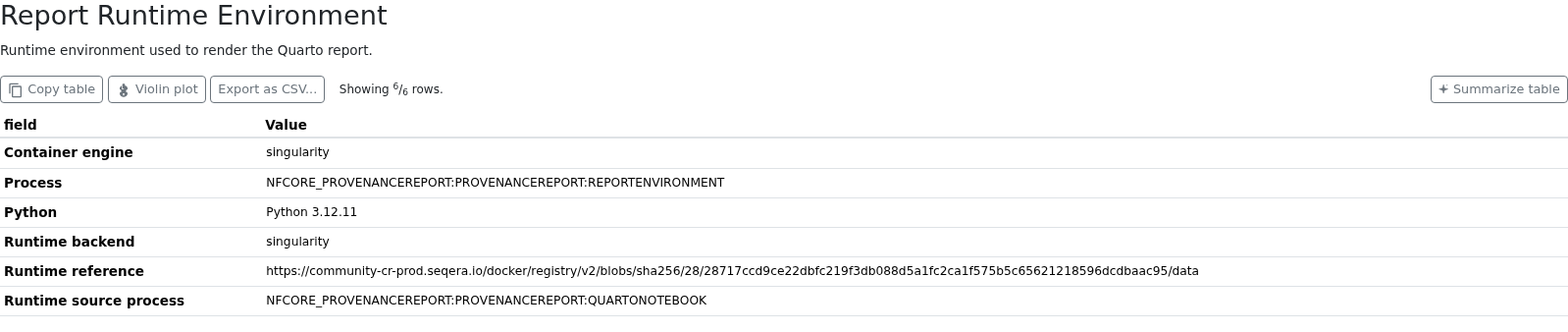
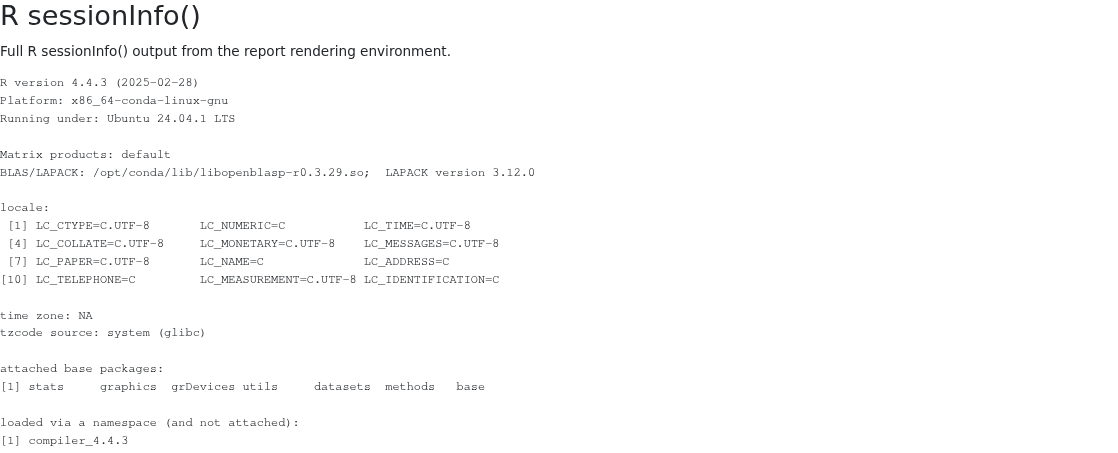
QUARTO_NOTEBOOKruntime backend and reference, container engine, active Nextflow profile,R sessionInfo()output, and Python version.REPORTENVIRONMENTinherits the resolved container or Conda runtime when possible; with no managed runtime, the runtime is reported asNot configured. - Pipeline and Nextflow versions, Quarto and Papermill versions, and package versions recorded from the notebook session by
QUARTO_NOTEBOOK.
Published outputs
The Pipeline Outputs table lists the files intended for users and their locations below the results directory. In this example, review_signoff.md was supplied with --document and is listed alongside the rendered Quarto report.

Report runtime environment
The Report Runtime Environment table identifies the runtime inherited from QUARTO_NOTEBOOK. The adjacent R sessionInfo() section records the R version, platform, locale, and packages visible to a fresh R session in that environment. Versions of packages referenced directly by the notebook are recorded separately in the MultiQC Software Versions section.
nf-prov provenance
Output files
pipeline_info/manifest_<timestamp>.bco.json: BioCompute Object provenance report.ro-crate-metadata.json: Workflow Run RO-Crate metadata at the results root.- Supporting Workflow Run RO-Crate files at the results root, including the pipeline
README.md,main.nf,nextflow.config,nextflow_schema.json, and copies of workflow inputs such as the samplesheet and optional review document.
The nf-prov plugin creates both provenance records at the end of the run. When --document is supplied, its top-level published copy is also recorded in the RO-Crate. The default timestamp suffix on the BCO filename can be changed with --trace_report_suffix.
Pipeline information
Output files
pipeline_info/- Reports generated by Nextflow:
execution_report_<timestamp>.html,execution_timeline_<timestamp>.html,execution_trace_<timestamp>.txt, andpipeline_dag_<timestamp>.html. - Reports generated by the pipeline:
pipeline_report.html,pipeline_report.txtandnf_core_provenancereport_software_mqc_versions.yml. Thepipeline_report*files will only be present if the--emailor--email_on_failparameters are used when running the pipeline. - Parameters used by the pipeline run:
params_<timestamp>.json.
- Reports generated by Nextflow:
Nextflow provides excellent functionality for generating various reports relevant to the running and execution of the pipeline. This will allow you to troubleshoot errors with the running of the pipeline, and also provide you with other information such as launch commands, run times and resource usage.